
Intermediate DifficultyPrompt Engineering
AI Engineer Portfolio Website Prompt (HTML, CSS & JS)
Generate a futuristic, high-converting AI Engineer portfolio using vanilla HTML, CSS, and JS. Copy this master UI/UX prompt with interactive canvas and Bento grids.
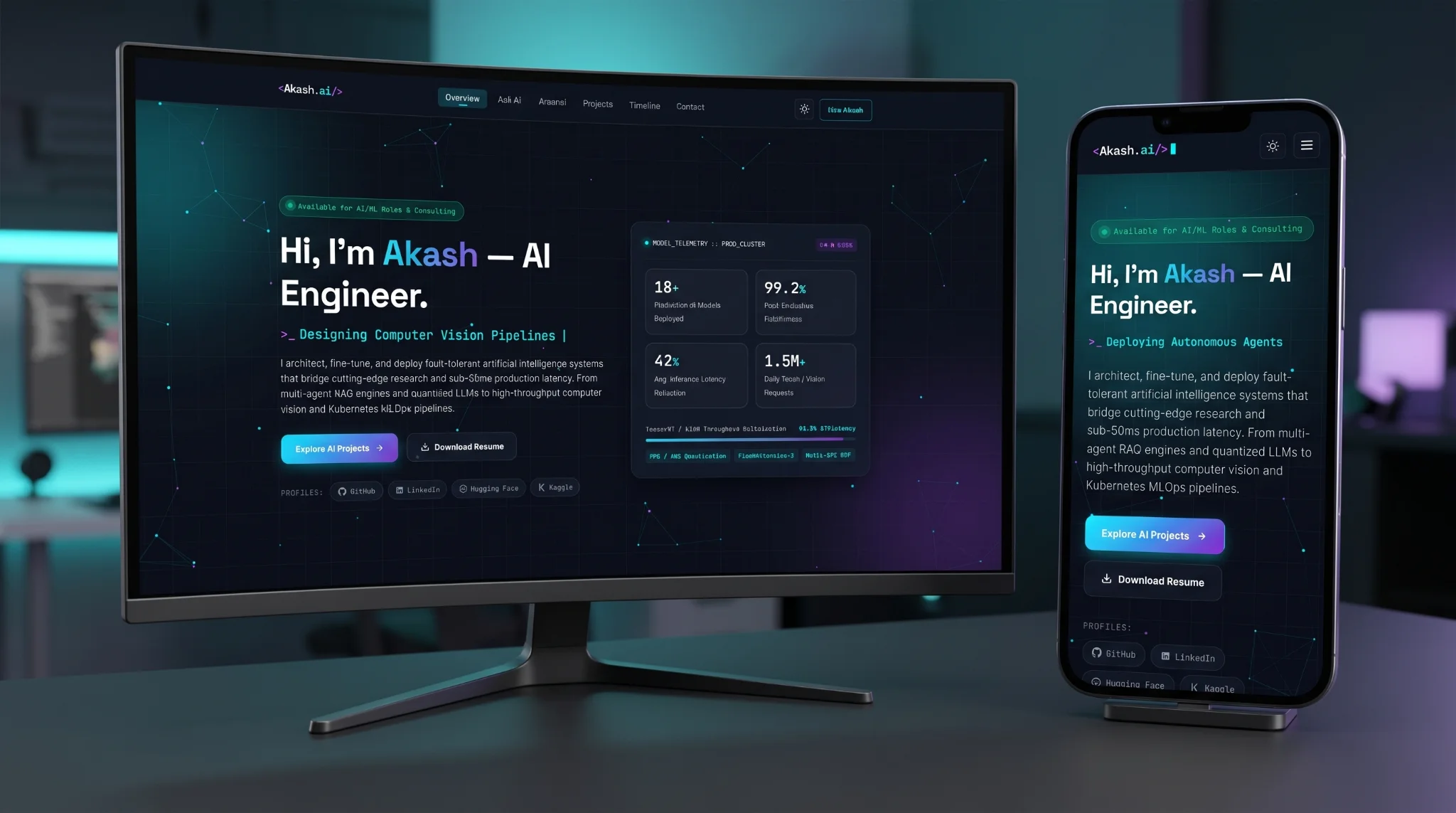
AI Engineer Portfolio Prompt
Built using Google Antigravity and the Gemini 4 Argon model, this portfolio website was developed end-to-end through autonomous AI orchestration. By interpreting a single UI/UX master prompt, the AI generated the complete, responsive frontend in pure HTML, CSS, and JavaScript, complete with an interactive canvas and Bento grid layout, using zero external frameworks.
Copy the prompt below:
Act as a Senior Frontend Developer and UI/UX Designer. Create a unique, professional, and eye-catching static portfolio website for "Akash", an AI Engineer, using only vanilla HTML5, modern CSS3, and vanilla JavaScript (ES6+). Do not use external CSS/JS frameworks like Bootstrap or React.

### 1. Design & Aesthetic Direction
- **Theme:** Futuristic Minimalism / Dark Mode Default (deep obsidian/slate background `#0a0e17`, electric cyan `#00f2fe` and neural violet `#7b2cbf` accents, high-contrast off-white text `#f0f6fc`). Include a working Dark/Light mode toggle.
- **Visual Style:** Bento-grid layouts, subtle glassmorphism (frosted glass cards with `backdrop-filter: blur`), glowing gradient borders on hover, and smooth micro-interactions.
- **Typography:** Pair a clean geometric sans-serif font (like 'Inter' or 'Space Grotesk' via Google Fonts) for headings/body with a monospace font (like 'JetBrains Mono' or 'Fira Code') for code snippets, model metrics, and tags.

### 2. User Experience (UX) & Performance Requirements
- **3-Second Clarity:** The hero section must immediately communicate who Akash is, what he builds, and provide clear calls-to-action (CTAs).
- **Interactive Background:** Implement a lightweight, high-performance HTML5 `<canvas>` neural network / particle node animation in the hero background that subtly responds to mouse movement without hurting scroll performance.
- **Scannable Hierarchy:** Use visual badges for tech stacks and bold metric callouts (e.g., "99.2% Accuracy", "40% Latency Reduction") on project cards so recruiters can scan achievements quickly.
- **Smooth Navigation:** Sticky glassmorphic navbar with active section highlighting on scroll, mobile hamburger menu, and smooth scrolling behavior.
- **Accessibility:** Semantic HTML tags, proper ARIA labels, keyboard-navigable interactive elements, and high text contrast.

### 3. Website Sections & Unique Features
1. **Hero Section:**
   - Status badge: "Available for AI/ML Roles & Consulting" with a pulsing green dot.
   - Headline: "Hi, I'm Akash — AI Engineer."
   - Dynamic JavaScript typing effect cycling through specialties: "Building Production LLMs", "Designing Computer Vision Pipelines", "Scaling MLOps Infrastructure", "Deploying Autonomous Agents".
   - Primary CTA ("Explore AI Projects") and Secondary CTA ("Download Resume" + quick social links for GitHub, LinkedIn, Hugging Face, and Kaggle).

2. **Interactive Terminal / "Ask Akash's AI" Widget (Unique UX Feature):**
   - A sleek, interactive command-line or chat-style card embedded on the page where visitors can click preset prompt chips (e.g., `whoami`, `top_skills`, `latest_model`, `contact_info`) or type simple commands, triggering simulated streaming text responses in vanilla JS.

3. **Technical Arsenal (Bento Grid):**
   - Visually categorized skill cards:
     - *LLMs & GenAI:* PyTorch, LangChain, LlamaIndex, RAG, Fine-Tuning (LoRA/QLoRA), OpenAI/Anthropic APIs.
     - *Machine Learning & CV:* TensorFlow, Scikit-Learn, OpenCV, YOLO, Transformers.
     - *MLOps & Backend:* Docker, Kubernetes, FastAPI, MLflow, AWS SageMaker, Vector DBs (Pinecone, Milvus).

4. **Featured AI Projects (Filterable Showcase):**
   - Include working JavaScript category filter buttons: `All`, `GenAI & LLMs`, `Computer Vision`, `MLOps`.
   - 4 detailed project cards displaying: Project Title, Architecture/Tech Stack tags, brief problem-solution summary, a highlighted performance metric badge, and links for "GitHub Repo" and "Live Demo / Hugging Face Space".

5. **Experience & Research Timeline:**
   - A vertical timeline highlighting AI engineering roles, model deployments, and research/publications with dates and quantifiable impact bullet points.

6. **Contact Section & Footer:**
   - Clean contact form with client-side JavaScript validation and simulated submission feedback, direct email copy-to-clipboard button with toast notification, and social links.

### 4. Code Deliverable Instructions
Provide the complete, production-ready, and well-commented code separated into three files:
1. `index.html` (complete semantic structure with realistic AI engineering placeholder data)
2. `styles.css` (CSS variables, responsive media queries, animations, and Bento grid layouts)
3. `script.js` (HTML5 canvas neural network animation, terminal widget logic, project filtering, scroll animations via IntersectionObserver, and copy-to-clipboard toast)

Do not use placeholders like `<!-- add more projects here -->` or truncate the CSS/JS. Write out the full implementation.