
LangChain vs. LangGraph: Which Framework Should You Use to Build AI Agents?
LangChain and LangGraph both help developers build AI agents, but they serve different purposes. Learn how they differ, explore practical use cases and Python examples, and discover which framework is best for building AI agents, RAG applications, and complex workflows.
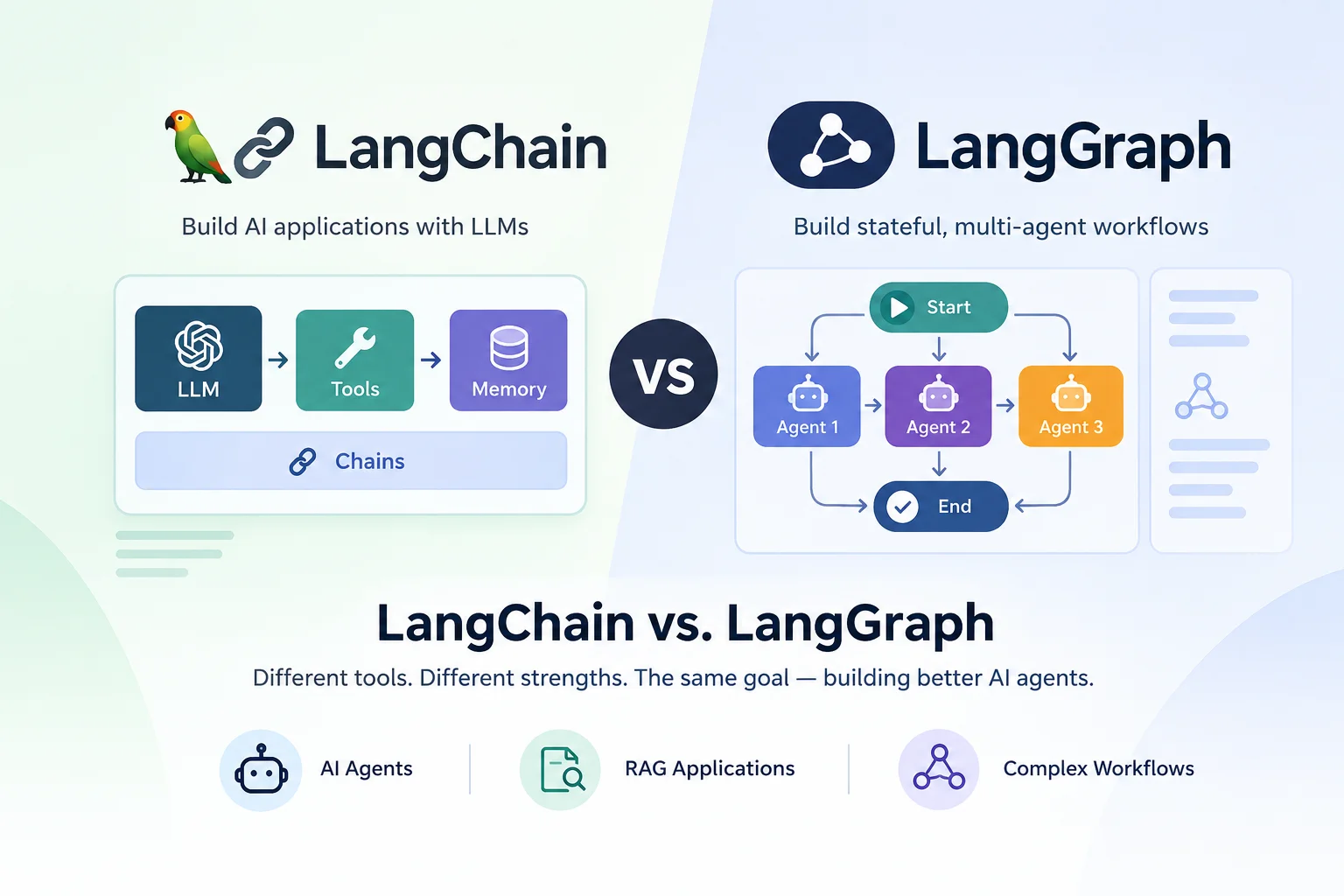
Table of Contents28 sections
AI applications often start with a simple requirement: answer questions using a language model. Then the requirements grow. The application needs to retrieve information from a database, call external APIs, remember previous interactions, decide which tool to use, or ask a human to approve an action before proceeding.
At some point, calling a language model and passing its response back to the user is no longer enough. You need a way to organize the entire process.
Two frameworks that frequently come up in this context are LangChain and LangGraph. Both are part of the same ecosystem, and both can be used to build AI agents. However, they approach application development at different levels.
LangChain makes it easier to assemble agents using models, tools, prompts, and reusable components. LangGraph focuses on controlling the execution of more complex workflows, particularly when they involve multiple steps, branching decisions, persistent state, or human intervention.
Choosing between them is not simply a matter of deciding which framework is more powerful. The better question is: How much control does your application need over what happens between the user's request and the final result?
Let's look at how each framework works, where it fits, and how to make that decision in practice.
1. What Is LangChain?
LangChain is an open-source framework for building applications powered by large language models (LLMs). It provides a common interface for working with different model providers and a collection of integrations and abstractions that reduce the amount of infrastructure developers need to write themselves.
For example, an application might need to use a model from OpenAI today and a model from Google tomorrow. Instead of writing all the integration logic from scratch, you can use LangChain's model interfaces and change the provider with relatively little disruption.
The framework also supports tools, structured outputs, middleware, and agent execution.
How LangChain agents work
An agent typically receives a request, reasons about what to do, and decides whether it needs to call a tool. After receiving the tool's result, the model can decide what to do next.
Consider a customer asking:
"Can you check the status of my order and tell me when it will arrive?"
A customer support agent might need to:
- Identify that the request concerns an order.
- Retrieve the customer's order information.
- Check the shipping status through an external API.
- Explain the result in plain language.
The model can choose the appropriate tools and determine how to use their results. LangChain provides a ready-made agent architecture for this kind of interaction.
Developers can then add business rules, validation, middleware, and other application-specific behavior without implementing the entire agent loop themselves.
A simple LangChain example
Suppose you are building an assistant that can look up a customer's order. You already have a Python function that retrieves order information.
You can expose that function as a tool and let the agent decide when to call it.
from langchain.agents import create_agent
from langchain.tools import tool


@tool
def get_order_status(order_id: str) -> str:
    """Retrieve the current status of an order."""
    # Replace this example with a real database or API call.
    orders = {
        "ORD-1001": "Shipped",
        "ORD-1002": "Processing",
    }

    return orders.get(order_id, "Order not found")


agent = create_agent(
    model="openai:gpt-4.1-mini",
    tools=[get_order_status],
    system_prompt=(
        "You are a customer support assistant. "
        "Use the order lookup tool when appropriate. "
        "Never invent an order status."
    ),
)

result = agent.invoke(
    {
        "messages": [
            {
                "role": "user",
                "content": "What is the status of order ORD-1001?",
            }
        ]
    }
)

print(result["messages"][-1].content)
This example illustrates the basic approach. The model can determine when to use the order lookup tool, and the agent handles the tool-calling loop.
The model identifier and provider integration must match the packages and credentials configured in your environment. The order data here is also illustrative, not a production database implementation.
Notice what you did not have to implement: a custom loop that repeatedly sends messages to the model, interprets tool calls, executes the tools, and sends their results back.
That is one of LangChain's main advantages. It lets you focus on the agent's capabilities and application behavior rather than rebuilding common agent infrastructure.
When LangChain is a good fit
LangChain is particularly useful when the application follows a relatively standard agent pattern.
Customer support assistants
An assistant can look up orders, check return policies, retrieve account information, and explain the results. You can expose each operation as a tool and let the agent choose which one is relevant.
Retrieval-augmented generation (RAG)
A RAG application retrieves relevant information from documents or a knowledge base before generating an answer. LangChain provides components for document loading, text splitting, embeddings, vector stores, and retrieval.
For example, an internal company assistant could retrieve engineering documentation and answer questions about deployment procedures.
Database and SQL assistants
An agent can translate a user's question into a database query, execute an approved query, and explain the returned data. Because database access introduces security and correctness concerns, you should restrict permissions and validate queries rather than trusting generated SQL blindly.
API assistants
An assistant can combine several API integrations to answer questions or perform routine operations. For example, a project management assistant might retrieve assigned tasks and summarize their current status.
In these cases, LangChain gives you a useful starting point without requiring you to design an entire orchestration system.
2. What Is LangGraph?
LangGraph is a framework and runtime for building stateful, multi-step workflows and agents.
Its central idea is to represent an application's execution as a graph.
A graph contains nodes, which perform operations, and edges, which determine where execution goes next. Some edges follow a fixed path; others depend on conditions evaluated during execution.
Nodes can contain ordinary Python code, invoke language models, execute tools, or perform other application operations.
This distinction matters when the order of operations is important or when an application needs more control than a standard agent loop provides.
How LangGraph works
Imagine an AI assistant that processes requests for refunds.
The business requires every request to follow a particular process:
- Retrieve the order.
- Check whether the order is eligible for a refund.
- Calculate the refundable amount.
- Request human approval if the refund exceeds a specified threshold.
- Issue the refund only after the required checks and approvals.
- Notify the customer.
Not every request should follow exactly the same path. An ineligible order should be rejected. A small refund might qualify for automatic processing, while a larger one might require a manager's approval.
You can represent this process explicitly in LangGraph.
The application controls which steps must execute, which conditions determine the next step, and where the workflow pauses for human input.
A language model can still make decisions within individual nodes, but the overall workflow does not have to depend entirely on the model deciding what to do next.
That combination of predictable application logic and model-driven decisions is one of LangGraph's most useful characteristics.
A simple LangGraph example
Consider a support workflow that classifies an incoming request and sends it to the appropriate handler.
The following example uses a fixed workflow with conditional routing.
from typing import Literal
from typing_extensions import TypedDict

from langgraph.graph import StateGraph, START, END


class SupportState(TypedDict):
    request: str
    category: str
    response: str


def classify_request(state: SupportState) -> dict:
    request = state["request"].lower()

    if "refund" in request or "return" in request:
        category = "billing"
    elif "error" in request or "crash" in request:
        category = "technical"
    else:
        category = "general"

    return {"category": category}


def handle_billing(state: SupportState) -> dict:
    return {
        "response": (
            "Your request concerns billing. "
            "The next step is to check the order and refund policy."
        )
    }


def handle_technical(state: SupportState) -> dict:
    return {
        "response": (
            "Your request concerns a technical issue. "
            "The next step is to collect diagnostic information."
        )
    }


def handle_general(state: SupportState) -> dict:
    return {
        "response": "Your request has been routed to general support."
    }


def route_request(
    state: SupportState,
) -> Literal["billing", "technical", "general"]:
    return state["category"]


builder = StateGraph(SupportState)

builder.add_node("classify", classify_request)
builder.add_node("billing", handle_billing)
builder.add_node("technical", handle_technical)
builder.add_node("general", handle_general)

builder.add_edge(START, "classify")

builder.add_conditional_edges(
    "classify",
    route_request,
    {
        "billing": "billing",
        "technical": "technical",
        "general": "general",
    },
)

builder.add_edge("billing", END)
builder.add_edge("technical", END)
builder.add_edge("general", END)

graph = builder.compile()

result = graph.invoke(
    {
        "request": "I need a refund for my recent order.",
        "category": "",
        "response": "",
    }
)

print(result["response"])
This example uses simple keyword-based classification to keep the graph easy to understand. A production implementation could replace that logic with a language model or a dedicated classifier.
The important part is the execution structure. The application classifies the request, follows a defined routing rule, executes the selected handler, and finishes.
You can inspect the workflow and determine which path a request should take. You can also add validation, database operations, retries, or additional branches without relying on a single model prompt to coordinate everything.
State is central to LangGraph
Each node can read the current state and return updates to it. The state represents the information the workflow needs as it progresses.
For a refund application, it might contain:
- Customer and order identifiers.
- Order details and refund eligibility.
- The calculated refund amount.
- The approval status.
- The result of the payment operation.
- The message that should be sent to the customer.
As the workflow moves through its nodes, relevant state is updated.
LangGraph also supports checkpointing, which can preserve workflow state between execution steps. With an appropriate checkpointer and configuration, an application can resume a conversation or workflow after an interruption instead of starting from scratch. Its persistence features also support human-in-the-loop workflows and recovery from failures.
This is particularly valuable for workflows that take a long time, require external approval, or must retain their progress across multiple interactions.
When LangGraph is a good fit
Human approval workflows
An AI system might prepare a refund, draft an email, or propose a database change, but a human must approve the action before it is executed. LangGraph can pause at the appropriate point and resume when approval is received.
Multi-step business processes
Insurance claims, document verification, onboarding, and financial operations often have mandatory steps and conditional paths. Graph-based orchestration makes those requirements easier to represent explicitly.
Multi-agent systems
A research application might delegate information gathering to specialized agents, combine their findings, and send the result to a reviewer. LangGraph can coordinate these stages and manage the shared state.
Long-running agents
Some tasks cannot finish in a single interaction. An agent might wait for an approval, process a lengthy workflow, or resume after an external service becomes available. LangGraph provides infrastructure for managing this kind of execution.
Workflows requiring precise control
If certain operations must always occur before others, or if different failures require different recovery strategies, explicit control flow can be easier to maintain than a single open-ended agent loop.
LangGraph is not limited to applications that use multiple agents. A single agent with a carefully controlled workflow can benefit just as much.
3. LangChain vs. LangGraph: The Main Differences
The clearest way to compare the frameworks is to look at how much of the execution logic each one asks you to manage.
| Feature | LangChain | LangGraph |
|---|---|---|
| Primary purpose | Build agents using higher-level abstractions | Orchestrate stateful, multi-step workflows and agents |
| Abstraction level | Higher-level | Lower-level |
| Typical starting point | An agent with a model and tools | A graph with state, nodes, and edges |
| Control flow | Standard agent loop, customizable through middleware and other components | Explicit graph structure and conditional transitions |
| Tool calling | Built into supported agent patterns | Can be implemented through nodes and routing |
| State management | Agent state and configurable context | Explicit workflow state and graph transitions |
| Persistence | Available through its underlying LangGraph runtime | Direct control over graph checkpointing and persistence |
| Human approval | Supported through agent capabilities and middleware | Can be modeled explicitly with interrupts and resumable execution |
| Best suited for | Standard tool-using agents and LLM applications | Custom orchestration and complex, stateful workflows |
| Initial development effort | Usually lower for standard agent patterns | Usually higher because you define more of the workflow |
One detail deserves special attention: persistence and human-in-the-loop capabilities are not exclusive to applications written directly with LangGraph.
LangChain's agent implementation is built on LangGraph, so LangChain agents can use capabilities provided by that runtime. The distinction is primarily about the level of abstraction and how much control you want over the workflow itself.
For example, you do not necessarily need to write a graph manually just because your support agent needs conversation persistence. A standard LangChain agent may already provide the behavior you need.
Direct use of LangGraph becomes more attractive when the application's execution structure itself is an important part of the design.
4. Real-World Examples: Which Framework Fits?
The best way to understand the difference is to examine situations that developers encounter when building AI applications.
The following are representative engineering scenarios, not claims about specific companies' internal implementations.
Example 1: A customer support chatbot
Suppose you are building a chatbot for an e-commerce platform.
Customers can ask about delivery dates, order status, return policies, and refunds. The agent has access to tools for retrieving orders, checking shipping information, and looking up company policies.
Start with LangChain.
The workflow is primarily conversational. The model can decide which tool to call based on the customer's request, and the application can return a response using the retrieved information.
LangChain lets you define the tools and instructions without building a custom orchestration graph.
Now suppose the requirements change. Refunds above a certain amount require manager approval. Some customer complaints must be escalated, and the system must resume the conversation after a manager responds.
You have two reasonable options.
You can keep using LangChain if its existing agent capabilities and customization mechanisms are sufficient. If the workflow requires detailed control over approval points, state transitions, and recovery, you can implement the critical process in LangGraph.
The important point is that the need for persistence alone does not automatically require direct LangGraph development.
Example 2: An AI research assistant
Imagine a research assistant that accepts a question and produces a report using information from several sources.
The application might need to:
- Interpret the research question.
- Search for relevant sources.
- Extract useful information.
- Identify missing evidence.
- Perform additional searches.
- Draft the report.
- Check whether the report is sufficiently supported.
- Revise it if necessary.
There is no single correct implementation for every research assistant.
For a lightweight assistant that searches a few sources and summarizes the results, LangChain may be sufficient. A standard agent can use search tools, gather information, and generate a report.
For a more structured research system, LangGraph offers greater control. You could make evidence collection a separate stage, route weak results back to another search step, and send the final draft through a validation stage.
For example, the graph could implement the following flow:
Question → Research → Evidence Check → Draft → Quality Review
If the evidence check fails, the workflow returns to research. If the draft passes review, it moves to completion.
You can also define limits on the number of research attempts and route persistent failures to a human reviewer.
This structure makes the workflow easier to inspect and gives you a defined place to enforce requirements that should not be left entirely to the model.
Example 3: A coding agent
Consider an AI coding agent that reads a repository, edits files, runs tests, and fixes errors.
A simple implementation could use a standard agent loop:
- Receive a coding task.
- Inspect relevant files.
- Decide which tool to call.
- Read or modify files.
- Run a command.
- Examine the output.
- Repeat until the task is complete.
LangChain can support this type of tool-using agent.
However, a more advanced coding agent may need to manage several distinct phases. It might inspect the repository, create a plan, implement changes, run tests, diagnose failures, retry a limited number of times, and request approval before applying a risky operation.
That is where LangGraph can become useful.
You could model the workflow as:
Understand Task → Plan → Implement → Test → Review
If tests fail, the workflow routes to a debugging stage. The debugging stage can return control to implementation, subject to a retry limit. If the changes pass the required checks, the workflow proceeds to review.
You can also save state between stages, record which files have changed, and pause for human review before executing a sensitive operation.
There is an important caveat: not every coding agent needs a graph. If a standard tool-calling loop already handles the requirements, introducing a graph may add unnecessary complexity.
Choose the graph-based approach when explicit orchestration makes the agent easier to control, test, and maintain.
Example 4: A document processing pipeline
Suppose a company receives invoices, extracts their contents, validates the information, and sends them to an accounting system.
A typical process might include:
- Extracting the vendor name, invoice number, date, and amount.
- Checking whether the invoice contains the required fields.
- Looking up the vendor in an internal database.
- Comparing the invoice against a purchase order.
- Flagging discrepancies.
- Requesting approval when necessary.
- Sending validated invoices to the accounting system.
Much of this process is deterministic. The application knows which checks must run and what should happen when a check fails.
A language model may help extract information from inconsistent documents, but it should not decide to skip mandatory financial validation simply because a prompt suggests doing so.
LangGraph is a strong fit for coordinating these steps. You can combine model-based extraction with ordinary Python validation, conditional routing, and human approval.
LangChain can still provide useful components for model interaction, document processing, and other parts of the application.
This example illustrates a broader principle: use language models where interpretation is useful, and explicit program logic where the application needs predictable behavior.
5. Can You Use LangChain and LangGraph Together?
Yes. In many applications, using both is a natural choice.
LangChain provides higher-level agent abstractions and integrations. LangGraph provides the underlying orchestration runtime and the ability to define custom graph-based workflows.
You do not have to choose one framework for the entire application.
For example, consider an AI-powered customer support platform.
You might use LangChain to define specialized agents for billing questions, technical support, and product information. Each agent would have its own instructions and tools.
LangGraph could coordinate the overall process:
- Receive a customer message.
- Route it to the appropriate agent.
- Gather the agent's response.
- Check whether the request requires escalation.
- Pause for human approval if necessary.
- Return the final response to the customer.
In this architecture, LangChain handles the individual agent behavior, while LangGraph controls the broader workflow.
A similar approach can work for research systems, coding assistants, and enterprise automation.
However, using both is not a requirement. If a single LangChain agent solves the problem, there is little reason to add another layer of orchestration. Likewise, you can use LangGraph directly without using LangChain's agent abstraction.
The goal is not to use as many frameworks as possible. It is to keep the implementation understandable while meeting the application's requirements.
6. Performance, Complexity, and Maintainability
Framework selection also affects how an application behaves in production.
Performance
Neither framework is automatically faster in every situation.
In an LLM application, response time often depends on model inference, the number of model calls, external API latency, and the amount of data being processed.
A graph with several sequential model calls may be slower than a straightforward agent. On the other hand, an explicitly designed workflow can avoid unnecessary model calls and execute independent operations in parallel where appropriate.
LangGraph gives you more direct control over the workflow, but that control does not guarantee better performance. The actual result depends on how the application is designed.
Complexity
LangChain reduces the amount of orchestration code required for common agent patterns.
You define the model, tools, and instructions, then customize the agent where needed. This is generally a sensible starting point for applications with straightforward requirements.
LangGraph requires you to think about state, nodes, transitions, and execution paths. That additional structure can take longer to implement and may introduce unnecessary overhead for a small application.
The benefit becomes clearer when the workflow has enough complexity that implicit behavior is harder to understand than an explicit graph.
Debugging and testing
A standard agent can be relatively easy to test when its responsibilities are limited. You can test individual tools, provide sample requests, and verify the responses.
As the workflow grows, testing only the final response becomes insufficient. You may also need to verify that the application followed the correct path, applied required checks, and handled failures properly.
A graph gives you explicit stages and transitions that can be tested individually.
For example, a refund workflow should be tested not only for successful refunds but also for ineligible orders, failed payment requests, rejected approvals, and interrupted execution.
LangGraph makes it possible to model these paths directly. You still need to write the tests and enforce the relevant business rules, but the workflow's structure gives you a useful foundation.
7. Common Mistakes When Choosing Between Them
Choosing LangGraph just because the application uses AI agents
A single agent that searches a knowledge base and answers questions does not necessarily need a custom graph.
Start with the simplest architecture that satisfies the requirements. Add orchestration when you have a concrete reason to do so.
Assuming LangChain cannot handle production workflows
LangChain is not limited to prototypes or simple chatbots. Its agents run on LangGraph's runtime, which provides capabilities such as persistence and human-in-the-loop execution.
The question is whether the higher-level abstraction gives you enough control for your particular workflow.
Using an LLM for every decision
Not every decision requires a language model.
Checking whether an order exists, validating an invoice amount, enforcing a retry limit, or confirming an approval status can usually be handled with ordinary code.
Using an LLM for these operations can introduce unnecessary cost, latency, and uncertainty.
Both frameworks allow you to combine model-driven behavior with deterministic application logic.
Treating human approval as a substitute for security
Pausing a workflow for human approval does not, by itself, make a sensitive operation safe.
You should still validate permissions, enforce access controls, verify the operation's parameters, and ensure that retries do not accidentally execute the same financial or external action more than once.
For example, a refund operation should be designed with appropriate authorization and idempotency protections, regardless of which framework coordinates it.
Building a graph before understanding the workflow
A graph is useful when you can identify the meaningful stages and transitions of a process.
If the workflow is still changing rapidly, or if the application only needs a conventional agent loop, starting with a graph may create work without providing much benefit.
It is usually better to establish the requirements first and choose the appropriate level of abstraction afterward.
8. A Practical Decision Guide
If you are starting a new AI project, the following questions can help narrow down the choice.
Choose LangChain first if:
- You need an agent that uses a model and a set of tools.
- Your application follows a conventional tool-calling loop.
- You want to build a RAG assistant or database assistant.
- You need integrations with different model providers and external services.
- You want to get a working implementation running without writing a custom orchestration layer.
Choose LangGraph directly if:
- You need to define explicit execution paths and conditional transitions.
- The application combines deterministic processing with model-driven decisions.
- You need custom pause-and-resume behavior for human approval.
- You have a multi-stage workflow with meaningful recovery paths.
- You need fine-grained control over state transitions, retries, and long-running execution.
Use both if:
- You want LangChain's agent abstractions inside a larger workflow.
- Different agents handle specialized tasks and a graph coordinates them.
- You need a convenient agent loop for some stages and custom orchestration for others.
There is also a useful fourth option to keep in mind: if you need a more complete agent harness with built-in planning, context management, filesystem capabilities, and subagent delegation, the LangChain ecosystem includes Deep Agents. It is worth evaluating when those higher-level capabilities are more relevant than building an agent from basic primitives.
9. Final Recommendation
For most developers, LangChain is a sensible starting point when building a new agent. It provides a convenient way to connect a model with tools and customize the agent's behavior.
LangGraph becomes more valuable when the execution process needs to be designed explicitly. That includes workflows with conditional paths, mandatory checks, human approvals, shared state, or recovery requirements.
These are not mutually exclusive approaches. LangChain's agents already use LangGraph under the hood, and applications can combine higher-level agent abstractions with custom graph-based orchestration.
Consider a simple customer support assistant. If it only needs to answer questions and retrieve order information, start with LangChain. If it must coordinate several specialized agents, enforce refund approval rules, recover interrupted operations, and manage a longer business process, consider using LangGraph for the orchestration.
The distinction comes down to the problem you are solving.
Use LangChain when you want a practical way to build an agent. Use LangGraph when you need to control the workflow around that agent. Use both when the application benefits from the two approaches.
The best framework is not the one with the most features. It is the one that lets you build the required behavior without making the application harder to understand and maintain.